Test Execution Model
Overview
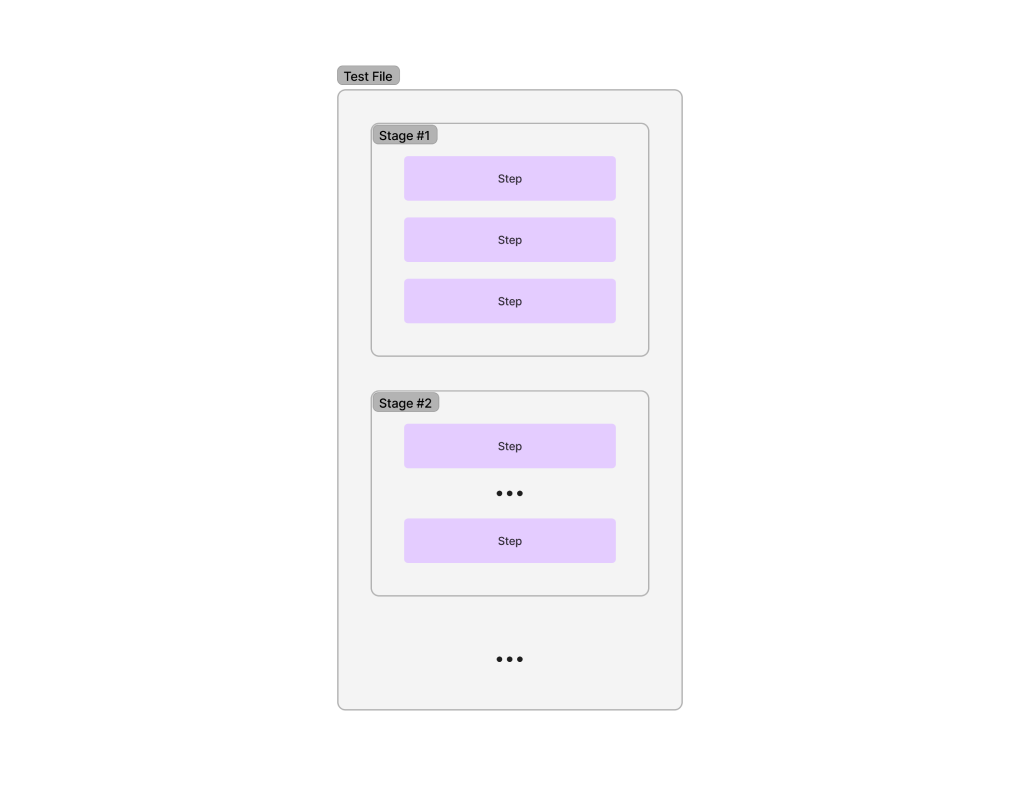
FirmwareCI test files are structured into stages containing steps. This hierarchical structure enables organized, sequential execution with clear success criteria and failure handling.
Test Structure
Hierarchy
Stages
Stages are named groups of related operations executed sequentially. Each stage contains one or more steps that accomplish a specific testing objective.
Example stages:
- Boot Test: Verify device boots and network connectivity
- Firmware Validation: Run security scans and integrity checks
- Performance Benchmarking: Execute performance tests and collect metrics
- Stress Testing: Apply load and verify stability
Stages execute in definition order. If a step fails within a stage, the stage fails and execution moves to the next stage.
Steps
Steps are individual test operations executed within a stage. FirmwareCI offers a comprehensive set of Test Step Commands ranging from simple bash commands to complex integrations like the Robot Test Framework.
Common step types:
- Command execution: Run shell commands on the DUT
- File operations: Copy files, create archives
- Network operations: Ping devices, check connectivity
- Firmware analysis: Scan with ChipSec, Binarly, FWHunt
- Hardware control: Power cycle, flash firmware, access serial
- Benchmarking: Run CPU tests, measure performance
Steps execute sequentially within their stage. Each step must complete successfully for the next step to begin.
Completion Semantics
FirmwareCI uses strict hierarchical completion logic ensuring test integrity.
Step Completion
A step completes successfully when its underlying command or operation returns a zero exit code. Non-zero exit codes indicate failure.
Success criteria vary by command:
- cmd: Command exits with code 0
- ping: Target responds within timeout
- copy: Files transfer successfully
- chipsec: Scan completes and expectations match
- cpustats: CPU metrics meet defined expectations
Stage Completion
A stage completes successfully only when all constituent steps execute without failure. If any step fails, the stage immediately fails.
Stage failure behavior:
- Mark the stage as failed
- Under
strict, skip the remaining steps in the stage (continueruns them anyway, but the stage still fails) - Skip all following stages
This fail-fast behavior stops execution at the first failing stage; only the Post-stage (Teardown) still runs, to guarantee cleanup.
Test Completion
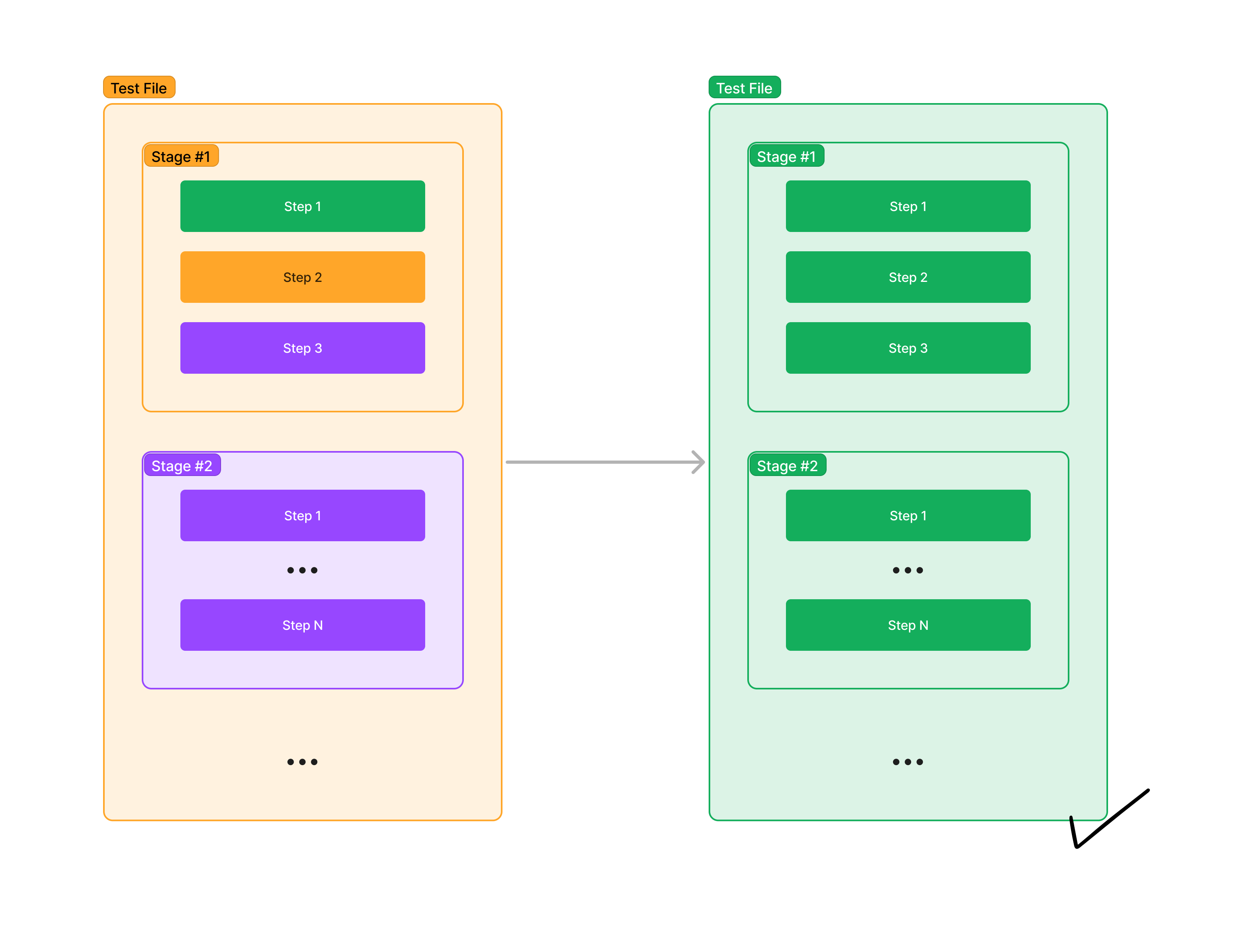
A test completes successfully only when every stage executes without failure. Partial success is not recognized - if any stage fails, the entire test fails.
Test result determination:
- All stages succeed → Test passes
- Any stage fails → Test fails
On-Error Behavior
FirmwareCI provides fine-grained control over how step failures affect test execution through the on-error option. It governs step-by-step execution within a stage only — it does not keep later stages running after a failure (see Cross-Stage Failure).
On-Error Modes
| Mode | Description |
|---|---|
strict | (Default) Stop execution within the stage when a step fails. Remaining steps in the stage are skipped. |
continue | Log the error but continue to the next step. The step is marked as failed, but execution proceeds. |
Inheritance
The on-error value is inherited through a hierarchy, from least to most specific:
- Default:
strict(if nothing is set) - Test Level: Set
on-errorat the top level of the test file - Stage Level: Set
on-errorwithin a stage definition - Step Level: Set
on-errorin the step’soptionsblock
More specific settings override less specific ones. For example, a step-level on-error: continue overrides a test-level on-error: strict.
Important: Pre-stage (Setup) and Post-stage (Teardown) do not inherit from the test-level on-error. They only use their own stage-level or step-level settings.
Failure Propagation
When a step fails, FirmwareCI behavior depends on the on-error setting.
With on-error: strict (Default)
The first failure marks the stage as failed and skips remaining steps in that stage.
With on-error: continue
With on-error: continue, all steps execute regardless of previous failures. The stage and test are still marked as failed, but execution continues.
Cross-Stage Failure
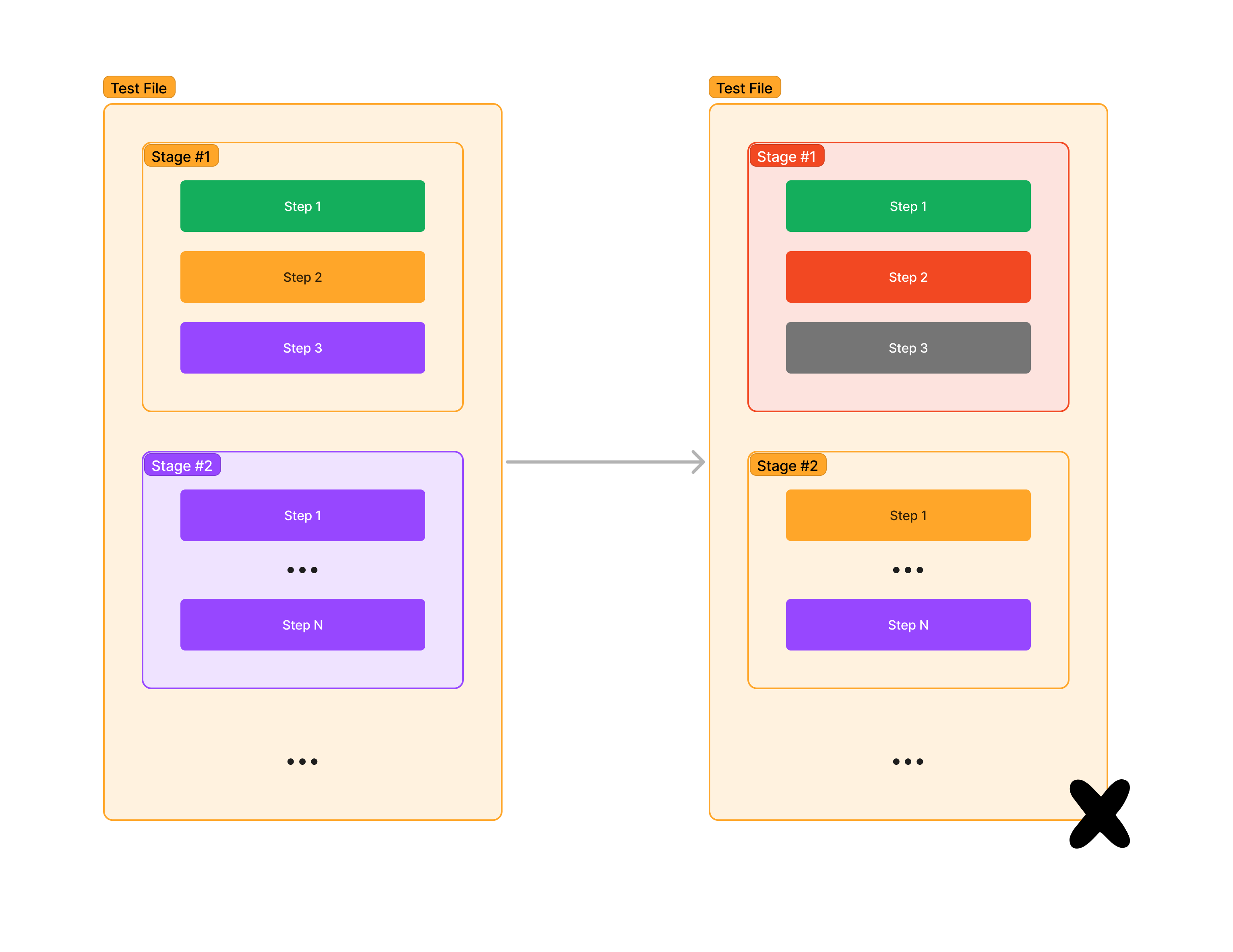
on-error only controls steps within a stage — it does not carry across stages. Once any stage fails, all following stages are skipped:
Because Stage 1 failed, Stage 2 (and any later stage) is skipped, regardless of any on-error: continue. The test result is permanently failed. There is currently no flag to keep later stages running after a failure: if some steps must run together despite failures, put them in the same stage with on-error: continue. The Post-stage (Teardown) is the one exception — it always runs, for cleanup (see Post-Stage Guaranteed Execution).
Execution Flow
Standard Flow
- Start: System begins with the first stage in the test file
- Execute steps: Within the stage, steps execute sequentially
- Step success: If all steps in the stage succeed, proceed to the next stage
- Step failure: The stage is marked failed. Under
strictthe remaining steps in the stage are skipped; undercontinuethey still run, but the stage is still failed - Stage failure: Once any stage fails, all following stages are skipped — execution proceeds directly to the Post-stage (Teardown), which always runs
- Report: Generate test report with pass/fail status
With Pre/Post Stages
Execution order:
- Pre-stage operations (Setup)
- All test stages
- Post-stage operations (Teardown) - always executed, regardless of test outcome
Post-Stage Guaranteed Execution
The Post-stage (Teardown) always executes, even when:
- Any test stage fails
- The Pre-stage fails
- Steps within stages fail
This guarantees proper cleanup and DUT state reset. Use the Post-stage for:
- Powering off the device
- Releasing hardware resources
- Cleaning up temporary files
- Resetting device state
Note: Pre-stage and Post-stage do not inherit on-error from the test level. Configure their error handling explicitly if needed:
Templating
Tests use template variables to access dynamic data:
Input templates: [[input.Binary]] - Data provided when triggering the workflow
Attribute templates: [[attributes.Host]] - DUT-specific configuration
Storage templates: [[storage.tools]] - References to storage items
Secret templates: [[secrets.APIToken]] - Sensitive data from workflow secrets
YAML anchors: Define reusable configuration blocks under defaults keyword
For comprehensive templating syntax, see Templating & Variables.
Next Steps
- Learn to write tests in the Writing Tests guide
- Explore Test File Reference for complete schema
- Review Test Step Commands for available operations